The shell
The shell is everything around the nuts: the screen, the buttons, pages, presets, saving and the settings every nut shares. It works the same in every nut.
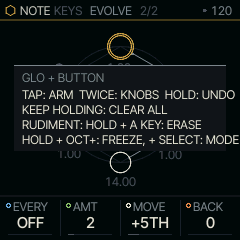
Every pair has two views: SOUND and NOTE. Tap HOME to flip between them (TAB); tap it twice for the pair playing behind (the background set), in the same view, and twice again for the next; hold it to choose the pair. Tap GLO for the system pages; hold it as SHIFT. OCT+ says yes, and OCT- says no or leaves (on PROJECTS they save and load, each asked first). SELECT walks the view's pages, PRESETS walks sounds, and the knobs set values. Hold GLO and tap any button to see what it does here.
The screen
The screen has three bands: the header, the nut's own picture, and the four knobs along the bottom.
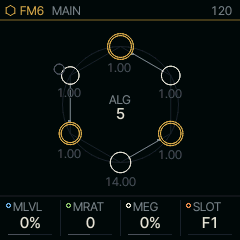
The header names the pair in front and the page. On a SOUND page it reads SOUND FM6 ENV, on a NOTE page NOTE KEYS ARP: the first word says which half of the pair the knobs belong to, and the colour of the glyph and the name is the nut's own. A count such as 3/7 after the page name says where you are in that button's pages. The number on the right is the tempo. A page that shows ALL changes something every part shares, such as the reverb. When the pair's part holds notes or hits (a take, a beat, a line), a small ring and the loop's length (2 BAR, or 2B where the line is full) sit left of the tempo, in both views, so a take is never hidden; while you record, REC and the bar take that place.
A part is one of the FM-1's four sound channels, each with its own sound, effects and pattern. What you play (PLAY) is on part 1 or 2 (they alternate as you switch, so the pair you left can ring out), RUDIMENT is BEAT on part 4, and LINES, ALIVE, TONNETZ, ENIGMA, S+H, CANON and ACID are LINE on part 3, one at a time. BEAT, LINE and a PLAY take keep playing when you leave them (The wheel).
Each knob card at the bottom has a coloured dot: blue, green, bone and orange from left to right, the same order as KNOB 1 to 4 on the panel. The tables in this manual use the same colours.
Buttons
Every button follows the same rules. A tap acts when you let go, if you held it for less than 300 ms. A hold begins at 300 ms, or at once if you touch another control while the button is down; the button then works as a modifier and does nothing when you let go. A long hold, 1.2 s with a ring filling on the screen, is kept for actions that destroy something. PLAY, REC, OCT- and OCT+ act the moment they go down, so the transport and the octave never lag.
| Button | Tap | Hold |
|---|---|---|
| HOME | TAB: the other view of the pair (SOUND or NOTE), where you left it; from a system page: back to the view; twice quickly: the pair playing behind (BEAT, LINE or a take you left looping, the one left last), and each double tap after it the next, round them all; with none, the pair you played before; in the view in front | the wheel (The wheel); with GLO tapped: the pair by knobs |
| GLO | SYSTEM, then SYSTEM 2, PROJECTS, ABOUT and LEGAL | SHIFT: a card lists what it adds |
| SCL | SCALE: the root and scale every nut shares; again: back to the page you came from | while it plays: FILL, as long as you hold it (the steps on FILL play, those on !FILL rest); SCL breathes and the header says FILL; with OCT- held: a reset (below) |
| EDIT ENV LFO | the SOUND's pages of that family; again: the next one, and past the last SOUND MAIN | |
| FX | the SOUND's effect pages; again: the next one, and past the last SOUND MAIN | the FX layer: the keys play effects on the whole mix (Effects) |
| ARP SEQ | ARP: the ARP page, MODE first, from any page; again: ARP 2, and back; twice quickly: HOLD on or off. SEQ: the pattern | ARP: HOLD on or off as you let go (no arp mode: the keys latch); SEQ: white keys enter steps, OCT+ doubles the pattern, PRESETS queues the part's NEXT pattern for the bar (Switching patterns live); the bottom band shows what SEQ does here; with OCT- held: a reset (below) |
| SAVE | store the sound: a question, OCT+ yes, OCT- no | try: turn knobs, let go and they snap back; OCT+ while held keeps them |
| REC | arm recording; playing: overdub on or off; twice quickly: knob moves recorded or not (REC MODE's + KNOBS), the arm kept | first ring: undo the last take (notes, LEN, knob moves); second: clear the pattern and its knob moves; with SELECT turned: REC MODE, ADD, ADD + KNOBS, REPLACE or REPLACE + KNOBS (Sequencing); the bottom band shows what REC does here |
| PLAY | start or stop (on press) | with REC held: arm, count in a bar, record |
| OCT- OCT+ | octave down or up (on press); on LINES (and RUDIMENT under a SOUND but DRUMS) the lanes' octave page in view |
Hold SEQ or REC and the knob cards give way to a map of what that button does with the other controls in the nut in front, only what works now; let go and the cards come back. Turn a knob while holding and its card shows again.
| Held | Map |
|---|---|
| SEQ, KEYS | WHITE: STEP ON/OFF (the last note played), C#5/D#5: the page, past 16 steps; OCT+/-: DOUBLE/HALF, or why not (NOTHING TO DOUBLE, FULL/HALF, DOUBLE: TAP REC FIRST) |
| SEQ, CHORD | as KEYS; once a chord has played, WHITE: LAST CHORD ON/OFF |
| SEQ, ALIVE and the generators (TONNETZ, ENIGMA, S+H, CANON) | OCT+/- only: the white keys enter no steps there |
| SEQ, RUDIMENT and LINES | WHITE: ACC SLD TIE (under DRUMS: ACCENT); C#5/D#5: the page, past 16 steps; OCT+/-: DOUBLE/HALF |
| REC | RING 1: what letting go after it undoes; RING 2: CLEAR; SELECT: the REC MODE; PLAY: COUNT IN when stopped |
| REC, RUDIMENT and LINES | first WHITE: ERASE STEP and LANE: ERASE LANE (playing: ERASE HITS, as the playhead passes), then the rings and SELECT |
With nothing held, RUDIMENT or LINES with no hit on any lane shows ALGORITHM: A BEAT WHITE: STEPS in the band instead of the cards, until a hit is placed or a knob turned.
Resets
Hold ARP, SEQ, EDIT or SCL, then hold OCT-: a ring fills for 1.2 s, named for what it resets, and when it is full that family goes back to its defaults. Let go of either button before the ring is full and nothing changes. A reset never touches the steps, the knob moves or the other half of the pair, and holding REC to its first ring (UNDO RESET) brings back what it changed; hold it again to reset once more.
| Held with OCT- | Resets |
|---|---|
| ARP | the NOTE engine in front: the arp (MODE OFF, RATE, OCT, GATE, SWG, PROB, HOLD, ORD); under CHORD also BASS, VOIC, QNT, STRM, TOP, TUNE, RPT, B3's added notes and chosen chord, and LATCH; under ALIVE and the note engines also their own four |
| SEQ | the pattern's SWG, GATE and QUANTIZE; LEN and DIV only when the pattern is empty, since they frame the take |
| EDIT | the SOUND, back to its preset or user slot as stored (the undo is UNDO SOUND) |
| SCL | ROOT, SCL, QNT and TRN, on every part |
While one of those buttons is held, OCT- breathes.
Hold GLO and tap any other button for a card of what it does in the nut in front. For EDIT, ENV, LFO and FX, the card lists that family's pages in the order the button walks them.
The lights
The buttons and keys light up to show where you are.
- Every button glows faintly. EDIT, ENV, LFO, FX, ARP, SCL and GLO glow brighter, and the button of the page you are on is lit: GLO on the system pages, SCL on SCALE.
- C4 and C5 glow faintly as landmarks, and a key you hold is lit.
- Hold HOME and the keys of the wheel light up: a white key for each SOUND, a black key for each NOTE engine, the selected pair brightest. HOME and OCT- are lit as the ways out, and on the PAIR page too. Hold GLO and the same keys light, with the pair in front brightest.
- A question (SAVE, PROJECTS, SPELL's SAVE) makes OCT+ breathe for yes, with OCT- glowing for no.
- ARP is low with MODE OFF, brighter while an arp mode, HOLD or LATCH waits for keys, and breathes while something plays by itself with no key down. REC blinks while armed, and PLAY is green while the transport runs. OCT+ or OCT- stays lit while the octave is shifted. HOME shows the view: lit in the SOUND view, breathing in the NOTE view, and dimmer while a part is muted. FX is lit while the FX layer is up. The header's tempo reads AUTOSAVE OFF while an unrestored session is being kept.
- The keys follow the nut in front. CHORD lights its quality keys and breathes LATCH while it holds; the root and fifth of the key glow. RUDIMENT lights the steps of the lane in front, the beats faintly, and the lane keys: the lane in front brightest, the lanes with hits mid, the empty ones faint. When the lane in front is empty and others play, their hits glow faintly on the white keys in place of the beats. On SEQ the white keys show the pattern's steps. The step under the playhead flips: lit when empty, dim when set. ALIVE shows its newest row.
- The lights answer what you do. Each knob or encoder detent dips the lit page button for an instant, a click under your finger. A key you let go fades through mid and the glow to dark. A HOME tap (TAB) dips HOME, a double tap blinks it, and SEQ blinks when a queued pattern lands. While RUDIMENT or LINES plays, each lane key glows up on its lane's hits and falls away over most of a second, so the lane that hits most stays up and a rare one blinks; the lane in front stays lit. On LINES' octave pages only this octave's hits light their keys, and a hit above or below pulses OCT+ or OCT- faintly.
- While the peek is up and nothing plays, sqrl's light glides along the keys under it. A corner hit flashes every button and the keys round sqrl.
Knobs and encoders
KNOB 1 to 4 turn the four cards at the bottom. A fast turn moves twice as far; with GLO held it does not, so a sweep lands exactly where you stop.
SELECT walks the pages of the view in front, in both directions, never into the other view (on MOUTH's SPELL it moves the cursor instead), and with GLO held it sets the tempo. On the shell's own pages it walks them in this order: SCALE, SYSTEM, SYSTEM 2, PROJECTS, ABOUT and LEGAL. On PAIR it turns the SOUND.
PRESETS walks the SOUND's factory sounds and your saved ones, on any page: the page stays where it is and its knobs show the new values. If you were editing the sound, hold REC until its first ring is full (UNDO SOUND) to get the edit back; hold it again for the preset.
ALGORITHM turns the one setting that most changes the nut's character: FM6's algorithm, LIZARD's mode, CHORD's voicing, ALIVE's rule, RUDIMENT's rhythm. Each nut's page names it. In the SOUND view it turns the SOUND's, in the NOTE view the NOTE engine's.
Saving
Tap SAVE and the shell asks before it writes: OCT+ yes, OCT- (or any other button) no. A sound that came from one of your user slots goes back into that slot under its name; anything else takes the next free slot. Saved sounds appear in PRESETS next to the factory ones. While the transport runs, SAVE says STOP TO SAVE and writes nothing: stop it first.
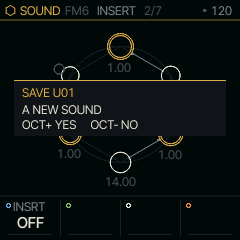
The question goes away after eight seconds without an answer. There are 32 user slots, shared by every SOUND; when they are all taken, SAVE says so.
Hold SAVE instead to try something out. Turn any knobs while you hold it, and when you let go everything snaps back. Press OCT+ while still holding SAVE to keep the changes.
Projects
A project is the whole of the music: every part's sound and pattern, the motion, the tempo, the scale you drew, each NOTE engine's HARMONY, and the pairs you were playing (the one in front, and BEAT's and LINE's with their mutes). PROJECTS is the third page GLO taps to, or two SELECT steps on from SYSTEM, and shows the four slots A to D. KNOB 1 or PRESETS moves between them. OCT+ asks to save to the slot under the cursor and OCT- asks to load it; OCT+ again is yes, any other button no. Asked while the transport runs, the save waits: the toast says SAVES TO C AT STOP, and the stop writes what is there then (SAVED TO C). A load or NEW before the stop takes it back.
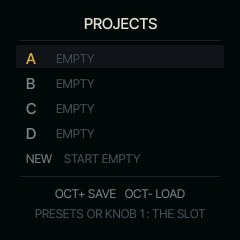
Loading brings the project's pairs back, in front and on BEAT and LINE, each with its sound and its pattern. A project keeps what you left off its parts too: the takes parked with pairs no part holds (FM6 + KEYS's melody after two other KEYS pairs took the parts), LINE's and BEAT's patterns under the NOTE engines not playing, each NOTE engine's settings, each SOUND's sound as you left it, and the knob moves parked with their pairs. They are saved beside the project and come back with it, so picking FM6 + KEYS again after a load or a power cycle brings its melody back. A save says SAVED: PARKED TAKES NOT KEPT in the rare case they do not fit; the project itself is saved. A project saved by stock Felucca, or by a SQRL-1 before this, loads onto the pair in front, and the other SOUND slots and NOTE engines keep what they had.
To start from silence, move the cursor past D to NEW and press OCT+ or OCT-, then OCT+ again for yes. Every part's steps and knob moves are emptied, BEAT and LINE hold nothing, no part is muted, and the takes left with other pairs go too. RUDIMENT's and LINES' lanes go back to =LEN with FILL and ROT 0 and ALGORITHM to EMPTY; MAP, PROG and ACID's line are off; every part's arp is off with nothing latched; the generators start fresh (CANON's ring and HOLD, ENIGMA's loop, ALIVE's rows, S+H); EVOLVE and MOVE are off. The sounds stay as they are, and the pair in front stays in front. The toast says NEW: EMPTY PROJECT. The empty project is the autosave at once, so a power cycle comes back blank. Until you change something, REC held to its first ring says UNDO NEW and brings all of it back (the takes left with pairs no part holds do not come back); UNDO NEW lasts until the power goes.
A project holds up to six notes a step, each with its own TUNE JUST tuning. A project too full to fit is refused with PROJECT TOO FULL and nothing is written.
SQRL-1 saves projects in a format of its own. Stock Felucca shows those slots as empty, and a stock Felucca backup saves them as empty, so restoring that backup erases them. Back up with SQRL-1's own editor, which keeps them whole. A project saved by a later version of SQRL-1 loads here without the settings this version does not have, and saving it here leaves those settings out.
SCALE
SCL opens the scale every nut shares (tap it again for HARMONY, and once more to go back): CHORD builds its chords from it, ALIVE, ENIGMA, S+H and HARP pick their notes in it, CANON answers in it, and QNT can snap the keys to it. TONNETZ walks its own triads and ignores it on purpose. QNT's settings: OFF plays every key as it is; SNAP rounds each key down to the scale; WHITE plays the scale on the white keys alone, from ROOT at C4, and silences the black keys; SEQ snaps the keys as SNAP does and maps the pattern's notes onto the scale as they play; SEQ+T is SEQ with the pattern following TRN too. NEAR moves each key and each pattern note to the nearest note of the scale; a note a semitone from two goes toward the note played before it, so a line stays close to where it came from. DROP plays a key or a pattern note only if it is on the scale: the rest go silent, and the pattern's steps stay as they were, so changing the scale changes which notes drop out. Play loose with QNT OFF, then pick DROP and a scale. CHORD makes the scale the chord PLAY sounds: the notes held on the PLAY parts (or, while an arp plays them one at a time, the ones still ringing), the last chord kept while nothing plays, and the scale itself until a chord has played. A part never hears its own notes, so KEYS on one PLAY part rounds to the chord of the other. Keys and pattern notes go to the nearest chord tone, as NEAR does; S+H, ENIGMA, ALIVE, CANON and the lanes pick only chord tones, and ACID bends to them. Set it with S+H or ACID in front and play chords on CHORD: the line follows each change. QNT belongs to the NOTE engine in front: SCALE sets it for the pairs on the parts now, and a pair brought in later plays with its own (CHORD keeps SNAP, its KEY).
On SCALE the keys are silent and show the scale: ROOT lit, its other notes mid. Draw your own on them. Press several keys together and, when you let go, those notes are the scale, the lowest the ROOT (SCALE reads USER). Tap a single key to put its note in the scale playing, or take it out; a named scale is copied first, so MIN with a tap of its sixth becomes Dorian. USER is kept with the project.
HARMONY
Tap SCL again from SCALE for HARMONY: every note the NOTE engine in front plays brings others in the scale, by its degrees, so a line of single notes plays in thirds, triads or sevenths that fit. Each NOTE engine keeps its own: S+H in triads and KEYS alone at once. With QNT CHORD the scale is the chord, so a third is the next chord tone.
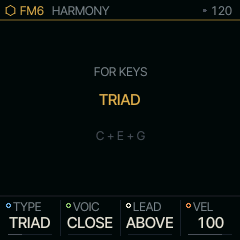
| Knob | What it does |
|---|---|
| TYPE | OFF, 3RD, 5TH, TRIAD, 7TH, SUS2, SUS4, 6TH, ADD9 or OCT |
| VOIC | CLOSE stacks them over the note; OPEN lifts the lowest an octave; DROP2 drops the second highest an octave; WIDE lifts them all |
| LEAD | ABOVE: the note you play is the bottom; BELOW: it is the top |
| VEL | the harmony's level against the note's |
The page shows what the root brings. The harmony's voices end with the note that started them, take voices from the part's eight, and record nothing: a take holds the notes you played, and plays them harmonized. CHORD, TONNETZ and HARP play chords already and take none; DRUMS takes none; and a part needs VOICE mode POLY for it, as the page says.
MOVE
Turn SELECT on from SCALE for MOVE: the scale every part plays in moves by itself while the transport runs, on the bar line, as O&C's Meta-Q moves its scales.
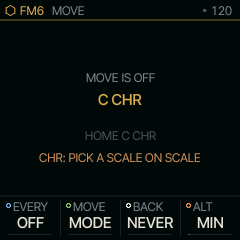
| Knob | What it does |
|---|---|
| EVERY | how often: OFF, every 1, 2, 4 or 8 bars |
| MOVE | MODE: the next darker mode on the same root (LYD MAJ MIX DOR MIN PHRY LOC, round); 5TH: the root a fifth up; ALT: between your scale and ALT; RAND: the root somewhere new |
| BACK | home after that many moves, then the moves begin again; NEVER: they go on |
| ALT | the other scale for ALT |
A move lands on the bar line, so the bar's first note already plays in it. Home is the scale you set by hand on SCALE; turning ROOT or SCALE while MOVE runs makes that the new home, the other one as it was. Stopping, or starting again from the top, puts each part's own scale back, so a project saved (only while stopped) keeps your own scale. CHORD, ALIVE, ENIGMA, S+H, CANON, HARP and the lanes follow each move at once. A recorded pattern keeps its notes unless QNT is SEQ, NEAR or DROP, which make it follow the scale as it moves: with DROP, different notes drop out at each move. MOVE's settings last until power-off.
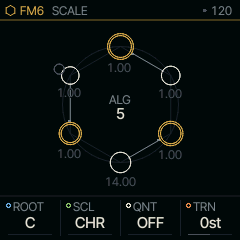
| Knob | Label | Range | Starts at |
|---|---|---|---|
| 1 | ROOT | C .. B | C |
| 2 | SCL | 38 valuesCHR MAJ MIN DOR MIX PEN MPEN HARM PHRY LYD LOC MEL BLUES WHOLE DIMHW DIMWH BLMAJ FOLK JAPAN GAMEL GYPSY ARAB FLAM MARWA SHREE KHMAJ MIMAL PARMS RANGS GANGS KAMES NATBH KAUNS BAIRG BTODI KTODI JOGES USER | CHR |
| 3 | QNT | OFF SNAP WHITE SEQ SEQ+T NEAR DROP CHORD | OFF |
| 4 | TRN | -24st .. +24st | 0st |
SYSTEM and ABOUT
Tap GLO for SYSTEM: the tempo, swing, tuning and clock source. Its top line is the DSP meter. It shows how much of each audio block the engines use on average, the peak over the last second, how many voices were shed to keep up, and how many audio blocks came late. The oldest released voice is shed first, then the oldest extra UNISON voice, then the oldest held note of a POLY part other than its lowest. The line turns red at a peak of 90 % or after any late block.
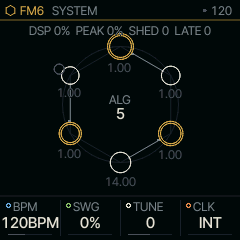
| Knob | Label | Range | Starts at |
|---|---|---|---|
| 1 | BPM | 40BPM .. 240BPM | 120BPM |
| 2 | SWG | 0% .. 100% | 0% |
| 3 | TUNE | -50 .. 50 | 0 |
| 4 | CLK | INT USB TRS | INT |
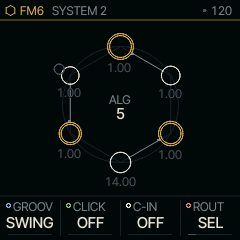
Tap GLO again for SYSTEM 2: the groove, the metronome and MIDI IN. GROOVE is the shape of the swing. Its depth is the swing already set: SEQ's SWG plus SYSTEM's for the patterns and CHORD's RPT, ARP 2's SWG for the arpeggiator. At depth 0 every groove plays straight:
- SWING puts every other 16th late (at SWG 100 it lands at 70 % of the 8th).
- SHUFFLE puts it on the triplet at SWG 100 (two thirds of the 8th).
- PUSH puts every other 16th early instead.
- LAID sits back: every other 16th late as SWING, and beats 2 and 4 late by two thirds as much.
- HUMAN moves each step a little, up to 8 ms at SWG 100, and its velocity up to 10 %. The moves are the same in every bar, so a loop repeats exactly, and each part has its own.
GROOVE is saved with a project.
CLICK is the metronome (OFF, REC while recording, ON) and COUNT-IN the bars counted in when you press PLAY with REC armed (REC + PLAY always counts in one bar).
ROUT is where MIDI notes coming in go. SEL, the default, sends every channel to the pair in front, whichever part it plays on, and the FM-1's own keys go out on channel 1. CH1-4 gives each of the four parts its channel (1 to 4, or the next block of four), so a sequencer can play BEAT and LINE on their own channels; the keys then go out on their part's channel. TRACK uses the channels a project set for each part. ROUT is saved with a project.
| Knob | Label | Range | Starts at |
|---|---|---|---|
| 1 | GROOV | SWING SHUFFLE PUSH LAID HUMAN | SWING |
| 2 | CLICK | OFF REC ON | OFF |
| 3 | C-IN | OFF 1 BAR 2 BARS | OFF |
| 4 | ROUT | CH1-4 SEL CH5-8 CH9-12 CH13-16 TRACK | SEL |
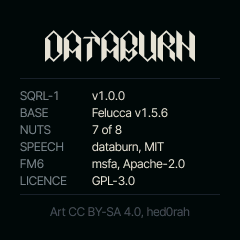
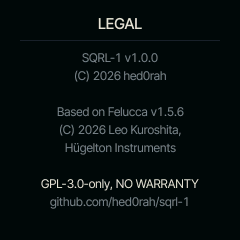
After PROJECTS, GLO goes on to ABOUT, which lists the firmware, its base and the licences. The SQRL-1 line ends with the build, the commit it was made from (v1.0.0+abc1234); the install page's ready line names the same one, so you can tell which build a page holds and which one the FM-1 runs. Then LEGAL, the copyright and licence notices with the source's address. Nibs, the cat who lives in the firmware, hides somewhere on ABOUT.
Leave the FM-1 alone for three minutes on a nut's screen, with no key held, and the squirrel starts bouncing round the screen like an old DVD logo, a new colour at every wall. Now and then it hits a corner exactly: it flashes, sparks fly and the panel flashes. Touch anything and the squirrel darts off the screen. The touch still does its job (PLAY plays, a key sounds), except a knob or encoder: its first detent only wakes the screen, because its card was not showing, and the next ones act.
What is kept over power-off
The wheel's layout and the pair you played last come back, with the NOTE engines' own four knobs (TONNETZ, ENIGMA, HARP, S+H, CANON), the tape echo's WOW, the reverb's PRE, the chorus's MODE, CHORD PLAY's settings, and SYSTEM 2's CLICK and COUNT-IN. ALIVE's knobs and CHORD's BASS start at their defaults. Each is written once it has settled and the FM-1 is quiet (the transport stopped, nothing sounding), so a write never interrupts a note; a held drone keeps it waiting. A dot by the tempo in the header shows a write is waiting. The pair comes back on the sound it was playing, a factory one or one you saved; your sounds are kept when you SAVE them, and follow the factory ones in PRESETS. MOUTH's phrases U1 to U8 are kept when you save them on SPELL.
The music is kept by itself, as a project holds it: every part's steps and takes, the knob moves, the lanes of RUDIMENT and LINES (LEN, FILL, ROT, NOTE and OCT), each part's DRUMS sound per drum, and the pairs in front, on BEAT and on LINE. It is written once something has changed, the transport is stopped and the FM-1 has been quiet for ten seconds (the same quiet as the settings), and at most once every 60 seconds, so the flash wears only when there is something new; a change in the last minute before power-off can be missing. At power-on it comes back, the toast says LAST SESSION RESTORED, and its pair is the one in front, whatever pair the settings name. After a crash it is not restored, in case the music was what crashed, and it is kept for the next clean start: the toast says LAST SESSION KEPT: AUTOSAVE OFF, and nothing is written over it until you save to or load from PROJECTS. The first start after an install counts as clean. Music Felucca saved this way is left alone, and Felucca leaves SQRL-1's. Save to PROJECTS what you want to keep for good. The takes parked with pairs no part holds, and the rest a project keeps beside it (see Projects), come back with the music. CHORD's added notes, EVOLVE's settings and everything else start fresh at power-on.