Sequencing
ARP and SEQ belong to the NOTE half of the pair, so changing PRESETS never touches them. Underneath are Felucca's sequencer and arpeggiator (which plays the keys you hold one after another), one of each per part. RUDIMENT has its own grid, described on RUDIMENT's page.
The arpeggiator
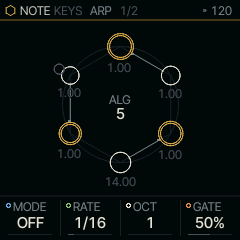
| Knob | Label | Range | Starts at |
|---|---|---|---|
| 1 | MODE | 15 valuesOFF UP DN UPDN RND ORD REPEAT DNUP UP+8 CONV DIVG PINKY THUMB WALK CHORD | OFF |
| 2 | RATE | 15 values4BAR 2BAR 1/1 1/2 1/4. 1/4 1/8. 1/4T 1/8 1/16. 1/8T 1/16 1/16T 1/32 1/32T | 1/16 |
| 3 | OCT | 1 .. 4 | 1 |
| 4 | GATE | 1% .. 100% | 50% |
MODE picks the pattern (the table lists the fifteen); OFF plays the keys as they are. RATE is the note value of each step, from 4 bars down to 1/32T: the straight values, triplets (1/4T, 1/8T, 1/16T, 1/32T) and dotted ones (1/4., 1/8., 1/16.). OCT is how many octaves it climbs, and GATE how long each note sounds within its step.
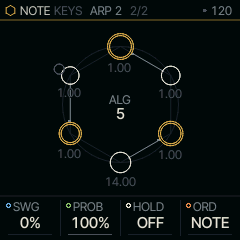
| Knob | Label | Range | Starts at |
|---|---|---|---|
| 1 | SWG | 0% .. 100% | 0% |
| 2 | PROB | 0% .. 100% | 100% |
| 3 | HOLD | OFF ON | OFF |
| 4 | ORD | NOTE PLAY | NOTE |
SWG swings every other step late, PROB is the chance each step plays, and HOLD keeps the arp running on the notes you let go of. ORD orders the held notes by pitch (NOTE) or in the order you pressed them (PLAY).
Hold the ARP button for 1.2 s and let go to switch HOLD on or off from any page; the screen says which as you hold, and HOLD changes as you let go, so a short press, or ARP held with another control, never touches it. Tapping ARP twice quickly does the same at once, for latching and letting go while you play over a take (the page stays where the first tap put it). With an arp mode it holds the arp; with MODE at OFF it latches the keys: notes you let go of keep sounding, and the next note you press with every key up starts a new latch. Turning HOLD off, turning an arp mode on or switching to another pair ends it. Under REC a latched note records as held.
Turning MODE to OFF turns the arp off in one move: HOLD goes off with it, and under CHORD so does LATCH, so nothing keeps sounding or latches the next chord. To latch the keys without an arp, hold ARP again afterwards.
The ARP button's light says what the arp is doing: low with MODE OFF and nothing latched, brighter while an arp mode (or HOLD, or CHORD's LATCH) is waiting for keys, and breathing while it plays on its own with no key down.
An arp left latched over its own take goes quiet while the part plays the take and is not armed, so the take never plays twice. Arm the part to record over it, or press a key to play the arp live again.
While the transport plays, the arp's first note after you press falls on its own grid: pressed in the first half of a RATE step it plays at once, pressed later it waits for the next step. So an arp recorded at the pattern's DIV holds one note per step, the way you heard it.
The arp works under KEYS, CHORD and ALIVE (under CHORD it arpeggiates the chord). TONNETZ, ENIGMA, S+H, CANON and HARP send their notes straight to the SOUND, past the arp; TONNETZ, ENIGMA, S+H and CANON step on the pattern's DIV, which their page shows in the header (see LEN on the generators for what LEN does to each).
The pattern
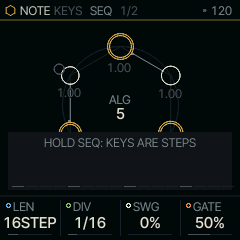
| Knob | Label | Range | Starts at |
|---|---|---|---|
| 1 | LEN | 1STEP .. 64STEP | 16STEP |
| 2 | DIV | 4BAR 2BAR 1/1 1/2 1/4 1/8 8T 1/16 16T 1/32 | 1/16 |
| 3 | SWG | 0% .. 100% | 0% |
| 4 | GATE | 1% .. 100% | 50% |
LEN is the pattern's length in steps (1-64), DIV the note value of a step, SWG the swing and GATE each step's length. Every part has its own LEN, so BEAT, LINE and the two PLAY parts can run different lengths against each other: LINES at 24 over RUDIMENT at 16 drifts and lines up again every 48 steps. LEN is knob 1 of the SEQ page on every NOTE engine.
Hold a step to edit it
Where the white keys are steps (RUDIMENT and LINES always, the SEQ page of KEYS and CHORD, ACID stopped), a tap turns a step on or off as you let go, and holding a white key edits that step. While it is held:
| Key | Does |
|---|---|
| C#5 | ACCENT on or off (on the lanes: every hit in the column) |
| D#5 | SLIDE into the next step on or off |
| F#5 | TIE on or off: the note before holds through this step |
| a black key F#3-A#4 | the lanes: that lane's hit on this step, so one hold stacks a column; KEYS and ACID: the step's note, that degree of the scale |
| OCT+ / OCT- | KEYS and ACID: the step's note an octave up or down |
| SELECT | KEYS and ACID: the step's note a semitone, off the scale too |
| KNOB 1 | CHNC, the chance the step plays (0-100%), then past 100% the conditions 1:2 to 4:4 (loop a of every b), FILL (only while SCL is held) and !FILL (only while it is not) |
| KNOB 2 | RATCH: the step plays x1 to x4 times in its length |
| KNOB 3 | NUDGE: the step plays up to half a step early (-8) or 7/16 late (+7), in sixteenths of a step |
| KNOB 4 | VEL, the step's velocity |
The held step's marks and hits light on their keys, the toast names them, and each note you set while stopped is heard. The knob cards show the held step's CHNC, RATCH, NUDGE and VEL while you hold it, in the NOTE view (its MAIN, ARP, SEQ); CHNC moves 5% a detent and VEL 4. With nothing held the same black keys past C5 page the steps, and F#5 is FOLLOW. A ratcheted step plays on time, so its NUDGE waits until RATCH is x1 again.
Locks. Keep the step held and go to the SOUND view (HOME, or EDIT, ENV, LFO or FX): the step stays held on the SOUND's page, and a knob there locks its value on that step only (DELAY, REVERB and CHORUS are the whole mix: their knobs work as ever). The card is starred (*CUT) while the step holds a lock, and the sound goes back to its own value on the next step. Turn a lock back to the sound's own value and it goes. Locks and recorded knob moves share one record per step and parameter: a lock replaces a knob move recorded on that step, and a lock turned back to the sound's own value removes whatever was there. A step turned off loses its locks. FM6's operator pages take no locks (NO LOCKS ON THE OPERATORS). A part holds up to 128 locks and knob moves together (LOCKS FULL).
On the lanes, each lane has its own CHNC and RATCH on each of its steps: on RUDIMENT and LINES, KNOB 1 and 2 of a held step set the lane in front's, so ratchets on the hats and chance on the snare's ghosts touch nothing else. A lane with its own LEN plays its own step's. NUDGE and VEL stay the step's, for every lane on it, and a lane with its own LEN plays on time. A project saved before keeps how it sounded: a step's CHNC and RATCH go to every lane on it.
Marks. A step that holds a CHNC (or a condition), a RATCH, a NUDGE or a lock shows it without being held: under the step on the SEQ page (and ACID's line, and LINES' columns) a dot for CHNC, a tick for RATCH, a dash for NUDGE and a bone diamond for a lock; on RUDIMENT's rings a small dot outside the hit, bone for a lock. Its key glows mid in place of lit.
SEQ lit. SEQ is lit solid whenever the white keys are steps: RUDIMENT and LINES on any page, KEYS and CHORD on the SEQ page or with SEQ held, ACID stopped. On SEQ's own pages without steps under the keys (EVOLVE, a generator's SEQ page) it glows mid.
SEQ held
Hold SEQ and the sixteen white keys from F3 to G5 become sixteen steps: a key with nothing on it gets a step, a key that has one loses it. A new step plays the last note you played, or C4 if you have not played one yet; under CHORD it takes the last chord you played, whole. Step entry works with KEYS and CHORD in front.
Step pages
A pattern longer than 16 steps has pages of 16, and you edit the page you are looking at. Of the two black keys past C5, the left one (C#5) turns the white keys a page back and the right one (D#5) a page forward, whatever is printed on them: steps 1-16, 17-32, 33-48, 49-64, as far as LEN goes. Under RUDIMENT and LINES, and on the SEQ page of KEYS and CHORD, they page with nothing held; anywhere else those keys play notes, so hold SEQ to page. A toast names the page.
The page stays where you put it while the pattern plays, as on a MiniBrute 2S: the playhead shows only on its own page. The header shows the page in view over the pages (P1/2) whenever LEN is past 16. A page key glows when there is a page that way, and the one toward the page the playhead is on pulses on the beat. PLAY from stop, or another pair, starts on page 1; a LEN too short for the page in view moves it to the last page.
If you would rather the view went with the playhead, press F#5 where the page keys page, with nothing held: FOLLOW ON. The view then turns to the playhead's page as it plays. F#5 again is FOLLOW OFF, the default. The setting is kept over power-off.
Turning LEN never clears a step: shorten a pattern and lengthen it again, and the steps past the short end are still there.
Hold SEQ and press OCT+ to double the pattern (DOUBLE): it plays once more after itself, notes, hits, accents, slides, ties and knob moves included, and LEN doubles (16 steps become 32, 32 become 64, the most a pattern holds). It works while the loop plays and while you record, so a short loop can grow into a longer one and the copy can take new parts: a fill in the last bar, a change of chord, a cowbell only on page 1. The other parts are left as they were. Under RUDIMENT and LINES a lane following LEN copies with the steps, and a lane with its own LEN doubles that LEN and copies too, so a polyrhythm keeps its ratio. A lane's DIV stays as it is through DOUBLE and HALF. Under HARP it doubles a recorded take. A first take sets its length when it closes, so tap REC to close it first.
Hold SEQ and tap OCT- to halve LEN (HALF). The steps past the end are kept, so a DOUBLE straight after a HALF gives back what was there. Held to the ring, SEQ + OCT- is still SEQ's reset. REC held to its first ring undoes a DOUBLE or a HALF.
LEN on the generators
A generator evolves: it runs free unless you lock it. On ENIGMA, S+H and CANON, LEN sets the loop; on TONNETZ and ALIVE it only sets how much FREEZE captures.
| Generator | LEN |
|---|---|
| ENIGMA | its register is LEN long (its own LEN knob is the same LEN); CHNC evolves it |
| S+H | free; locked (RANGE past 4 OCT: 1-4 LOCK), every source starts again from its seed each LEN |
| CANON | HOLD loops the last LEN steps |
| TONNETZ, ALIVE | they run free; LEN is the length FREEZE takes of them, and turning it says so |
Switching patterns live
The four PROJECTS slots double as pattern banks. Save a project to A, change the pattern, save it to B, and so on; then, while it plays, a part can move to another slot's pattern on the next bar.
Hold SEQ and turn PRESETS: the toast walks NEXT through A, B, C, D and OFF for the part in front (NEXT B AT THE BAR: SOUND STAYS). Let go of SEQ to queue it. The header breathes NEXT B until the bar line, a bar being 16 steps of the clock from the transport's start. On the bar line the part plays that slot's steps, LEN, DIV, SWG and GATE, its knob moves and its locks, from step 1 (on RUDIMENT and LINES its lanes too). The switch lands on the clock's bar line whatever the part's LEN, and the SOUND, the other parts and the generators stay as they are.
The toast says PATTERN B: SOUND STAYS when it lands. Queue other parts the same way; they must take the same slot (ONE SLOT AT A TIME: B IS QUEUED). NEXT: OFF takes the queue back. An empty slot queues nothing (SLOT D IS EMPTY). Stopped, the switch happens at once. The slot's steps are its part's: a slot saved with another pair on that part still gives its steps. REC's first ring does not undo a switch. This queue is how SQRL-1 plays a song: Felucca's song chain is left out, and the editor no longer offers it.
EVOLVE
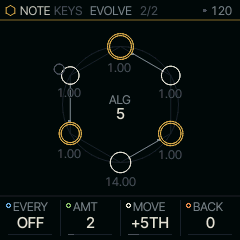
| Knob | Label | Range | Starts at |
|---|---|---|---|
| 1 | EVERY | OFF 1 BAR 2 BARS 4 BARS 8 BARS | OFF |
| 2 | AMT | 1 .. 8 | 2 |
| 3 | MOVE | +3RD +5TH OCT I-IV-V-I I-VI-IV-V | +5TH |
| 4 | BACK | 0 .. 8 | 0 |
Tap SEQ again from the SEQ page for EVOLVE: the pattern changes by itself while it plays, every EVERY bars (1, 2, 4 or 8; OFF stops it). It changes what plays, never the steps you stored, so stopping, EVERY OFF or an edit of the steps plays them as they are again. Each part has its own EVOLVE, and each change follows a seed, so the same loop evolves the same way each time you play it.
| On | It changes |
|---|---|
| a take (KEYS, CHORD, HARP) | the whole take moves by MOVE: +3RD and +5TH climb a third or a fifth of the scale at each change, folding back within an octave; OCT goes up an octave and back; I-IV-V-I and I-VI-IV-V walk the progression. The notes stay in SCALE. "Up a fifth every 2 bars" is EVERY 2, MOVE +5TH |
| LINES' lanes | AMT hits at each change: a hit moves a degree up or down (WHAT NOTES), to an empty step beside it (RHYTHM), or either (BOTH). The changes build on each other |
| RUDIMENT's beat | AMT hits drift to an empty step beside them, as they do with PRESETS and a lane key held, and build on each other. On MAP, X or Y drifts instead, by AMT x 4 |
BACK takes it home after that many changes and starts again; 0 never goes back. EVOLVE's settings last until power-off.
FREEZE
Hold REC and press OCT+ to FREEZE a generator: what it plays is written into lanes you can edit, and REC's first ring (UNDO BEAT) takes it back.
| In front | FREEZE writes |
|---|---|
| RUDIMENT on MAP | the map's hits as they play this cycle into KICK, SNARE and HATCL, accents too; ALGORITHM leaves MAP, so the beat stays as it is |
| LINES with a LINE line | nothing new: the line is already in the lanes. DENS and SPAN stop rewriting it |
| ALIVE, TONNETZ, ENIGMA, S+H or CANON on LINE | the last loop it played into LINES' lanes, one pitch a lane, lowest first (the eight it played most; another note goes on the nearest), each lane following LEN. LINE then plays LINES under the same SOUND, so you hear what you heard, now as steps. Play a whole loop first |
A FREEZE of a generator on LINE comes back whole with REC's first ring: the generator, and LINES' lanes and notes as they were.
Transport and recording
PLAY starts and stops the transport. REC arms recording on the part in front; tapped while playing, it starts or ends an overdub. Hold REC and press PLAY to arm, count in one bar with the click, and start recording; while the loop already plays, REC + PLAY arms it and the loop runs on.
Stopped, hold REC and press a white key to erase that step on the page in front, under KEYS and CHORD as on the lanes. While it plays, under KEYS and CHORD, hold REC and hold a key instead: that key's note (under CHORD, its chord's notes) leaves every step the playhead passes while you hold, so a wrong note goes on its next pass and the rest of each step stays. Hold it through a whole loop to catch every one. Either way the key does not sound, the arm stays as it was, and one UNDO TAKE brings back everything the hold erased.
A note keeps the velocity you played it at; only a full strike (127) records as an ACCENT. Recording over a step keeps the louder of the two, a step entered by hand counting as 96. Under VCE LEG or UNI, a note played while the one before is still held records sliding into it, so it plays back joined, without a new attack.
Recording takes what you play on PLAY: the keys, CHORD and its strums, the arpeggiator and HARP. One press is one step: a chord goes whole into the step you pressed it in, however STRM spreads its sound, and a chord played legato keeps the notes it shares with the one before. A note you hold ties on into the empty steps after it, and stops at the first step that already plays, so recording over a loop never erases a step that plays, HOLD's latched chords included. The arpeggiator rewrites the steps it plays into on each pass, so one left armed does not pile up. HARP is played from the keys, so it records as the keys do, and you hear its take while you add to it. LINE's generators (ALIVE, TONNETZ, ENIGMA, S+H, CANON) are never recorded: they are LINE's content, and play on while you record over them on PLAY.
Under QNT SEQ+T a note is recorded as you heard it: it plays back where it sounded, not moved by TRN twice.
REC MODE
Hold REC and turn SELECT to choose what recording does. Tapping REC twice quickly flips + KNOBS alone, armed or not, and leaves the arm as it was: the toast says KNOBS RECORD or NOTES ONLY, so you can let one pass of knob moves in and go back to notes without leaving the keys. Arming names any mode but ADD, the header says RPL instead of REC in REPLACE, and the FM-1 keeps the mode over power-off.
| Mode | What it does |
|---|---|
| ADD | the default: a note goes in with what the step holds |
| ADD + KNOBS | the same, and knob moves record too |
| REPLACE | the first note a pass puts in a step takes the place of what an earlier pass left there, so a chord replaces a chord. Steps you play nothing into stay, and a held note ties over an earlier pass's steps |
| REPLACE + KNOBS | the same, with knob moves |
Lanes (RUDIMENT, LINES, DRUMS) always add their hits.
The arp and the generators record too. In ADD each pass's notes go in with the chord a step holds, and the next pass takes back only the notes the last one left, so a latched arp armed over a CHORD take plays over the chords without eating them and never piles up. In REPLACE a pass rewrites the steps it plays into.
On an empty pattern, the first take sets the loop's length: the bars it ran, rounded to the nearest (2.4 bars make 2, 2.6 make 3), up to 64 steps, and never short of a note you played: a note past the bar it rounds to adds that bar. That holds from stop, after REC + PLAY's count-in (a chord in its last eighth lands on step 1), and while a pair behind keeps the transport running: arm REC, play, and tap REC to close the take. Armed while the transport runs, the loop starts at the bar of your first note: arm, wait for the moment, play, and the bars before it are not part of the loop. The take's steps, knob moves and locks turn with it and it plays on in time. From stop, the silent bars before your first note stay in the loop. Later takes overdub at that length. The header shows the count-in's beats, then REC (RPL in REPLACE), the bar and the bars in the loop (REC 3/-- while a first take is still open), and the take.
Hold REC and a ring fills. Let go once it is full to undo the last take: the pattern, its length and its knob moves go back to how they were before it. There is one level of undo, and the ring says what it would undo: UNDO TAKE, UNDO BEAT in RUDIMENT (a rhythm loaded, a lane's LEN FILL or ROT turned, steps erased with REC held), or UNDO SOUND after PRESETS or a MIDI Program Change replaced the sound you were editing. Keep holding through a second ring to clear the pattern and its knob moves, whatever the NOTE engine; RUDIMENT clears the whole beat, every lane, and its knob moves. A clear can be undone the same way. Under ALIVE and the generators this is how a take stops silencing them. Either way the arm stays as it was. Let go before the first ring closes and REC counts as a tap.
Knob moves
REC records notes only, until you pick ADD + KNOBS or REPLACE + KNOBS in REC MODE. Then a knob you turn while the transport runs and REC is armed is recorded at its step and plays back each loop, the INSERT's own knobs, a kit's TUNE and a MIDI controller's CC included. The DRUM page's per-drum settings, INSERT 2's DRV, KTRK and ENV and the shell instruments' own knobs (CHORD PLAY, PROG, a NOTE engine's four) are not recorded.
A knob that will not stay where you put it has recorded moves. UNDO TAKE takes back the moves the last take made, and the second ring's clear takes the part's moves with its notes; the knobs go back to where they were before you recorded. UNDO TAKE after a clear brings back both. Locks set in the editor stay. A clear, ERASE and the other actions REC can take back say HOLD REC: UNDO under their toast.
A pattern belongs to its NOTE engine and goes where it goes, and knob moves belong to the pair that recorded them: switch away and back to the same pair, however many pairs in between and whichever part it lands on, and both are there. The pair that takes the old part plays none of them. Put the NOTE engine under another SOUND and it brings its notes, not the last SOUND's knob moves, which would mean nothing to another engine; they come back with that SOUND.
The tempo is on SYSTEM (tap GLO), or hold GLO and turn SELECT from any page. CLK on SYSTEM takes the clock from the FM-1 itself, from USB MIDI or from the TRS MIDI input.