 LINESNOTEplays a line in lanes
LINES
LINES is RUDIMENT's lanes again, a set of its own: eight lanes of steps, each its own length, each lane a note. It plays a line, a bass or an acid line, the way Bitwig's Stepwise does, on the LINE track, while RUDIMENT keeps the drums going on BEAT.
plays a line in lanes
- Half
- NOTE
- Reach it
- black key F#4 in the wheel
- ALGORITHM
- LINE
Playing it
LINES works as RUDIMENT does, with the same keys, knobs and gestures. Tap a black key to put a lane in front and white keys to set its steps; KNOB 2 to 4 set the lane's LEN, FILL and ROT, live, and with a lane key held on any page KNOB 1 is its DIV, the length of its step against the pattern's (x2 to 1/4: a triplet line over straight ones); ALGORITHM writes a line (LINE, below); REC held as an eraser; hold a white key for C#5 ACCENT, D#5 SLIDE, F#5 TIE and the lane keys to stack notes on that step; REC held to its first ring undoes the last change. The lanes are its own: what you do here leaves RUDIMENT's beat as it was. Stopped, a lane key and a step turned on sound that lane's note once, as on RUDIMENT.
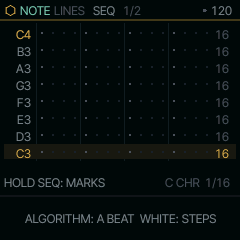
Under any SOUND but DRUMS the screen draws the lanes as rows of notes, lane 1 at the bottom, as RUDIMENT's lines do. The notes are the scale's eight degrees up from ROOT, so they follow SCL, and OCT on the NOTE page moves them all by octaves. The NOTE page is RUDIMENT's: RHY, LANE, the lane in front's NOTE and OCT. NOTE sets a lane to any note, off the scale or in another octave; turned all the way down to AUTO, the lane is back on its degree. Under DRUMS it draws rings and plays the kit, as RUDIMENT does.
Octave pages
OCT- and OCT+ move the eight lanes in view by octaves, two down to two up: a page of eight notes at a time, the lane names showing which. A tap puts its hit in the octave in view, so a line can run over several octaves on the same lanes. A hit already on in another octave comes to this one; tapped again, it goes off. The keys show this octave's hits lit and the other octaves' low, and on the screen a hit above the octave in view is a tick at the top of its cell, one below a tick at the bottom. OCT+ or OCT- stays lit while the view is off octave 0, and the bottom line says which octave it is. Playing, the lane keys glow as their lanes hit in the octave in view, and a hit on another page pulses OCT+ or OCT- faintly. Each hit keeps its octave as it moves (a nudge, DOUBLE, EVOLVE), a project and the autosave keep them, and a note recorded an octave or more from a lane's note lands on that lane in its octave. A new line (LINE) or a new beat starts every hit in octave 0. A pattern switched in live (SEQ held, PRESETS) keeps each hit's octave; NEW's undo still brings a line back flat, every hit in octave 0. RUDIMENT has the same pages under any SOUND but DRUMS.
LINE: a line from a seed
ALGORITHM turns LINE, and each detent writes a line onto the lanes, as long as LEN on the SEQ page (up to 32 steps), after the TB-3PO idea in Hemisphere: one note on each step that plays, walking the scale mostly by step, sometimes home to the root, sometimes a leap, with accents, slides into the next note and ties that hold one. Each number is its own line, so turning back finds the same one again; 0 is an empty grid. It stays in SCALE, as the lanes do. The line replaces the lanes' steps, so REC held to its first ring (UNDO BEAT) brings back what was there.
On the LINE page, DENS sets how many of the line's steps play and SPAN how many lanes the line uses, which is its range: 1 is a single note, 8 the scale's eight degrees. They shape the same line: one more DENS adds one note and moves none, one less takes one away, and SPAN stretches the line's shape over more lanes or squeezes it into fewer, on the same steps. LEN never writes the line again: turned longer, the new steps are empty, ready for what you add; turned shorter and back, the steps past it come back. To have the line drawn at a new length, turn LEN first, then ALGORITHM. REC held to its first ring undoes a run of DENS or SPAN turns at once. DENS and SPAN are shared with ACID, whose line writer this is too. LINE goes from 1 to 255.
TRN, the LINE page's third knob, moves the whole line up to 12 semitones up or down as it plays, as a 303's transpose does: the steps stay as they are, and the next note plays at the new pitch, with no note left hanging. A project keeps it. STYLE, the fourth, is how the writer draws over the same seed and the same DENS steps:
- WALK: by step through the scale, sometimes home to the root, sometimes a leap (the lines LINE always gave).
- OCTAVE: the 303 bounce, the root and its octave with a fifth now and then, sliding on the jumps.
- PEDAL: the root under every other note, the walk between, as Berlin school sequences go.
- ARP: the chord broken up, down, or up and back, the octave on top.
- CALL: the first half walks and the second answers it with the same notes, its last quarter varied and ending home.
Turning STYLE draws the line again, and REC's first ring takes a run of turns back. ACID's lines take STYLE too.
LINES has RUDIMENT's LANE 2 page as well, for a lane's PAD, LOOP, WAKE and NAP (RUDIMENT). From there it is an ordinary set of lanes: tap steps in or out, mark them, nudge a lane with ALGORITHM while its key is held. The first edit you make by hand keeps the line as it is (KEPT), so DENS and SPAN never write over it.
A beat and a line
- Hold HOME, press F4 (DRUMS) and A#4 (RUDIMENT), let go, and turn ALGORITHM to a rhythm.
- Hold HOME, press a SOUND's white key (ANALOG on A4, or FM6 on C4) and F#4 (LINES), and let go. The beat stays on BEAT: it plays on under the line.
- Press PLAY and turn ALGORITHM for a line, or tap steps into a few lanes. Hold SEQ and tap a step of the lane in front: once gives its hit an ACCENT, twice a SLIDE. With the SOUND's VCE on MONO or LEGATO and GLIDE turned up, a slide glides into the next note: a 303 line over the beat. The bottom line says HOLD SEQ: MARKS, and while SEQ is held the knob cards show WHITE: ACC SLD TIE.
LINES plays on part 3, the LINE track, which it shares with ALIVE, TONNETZ, ENIGMA, S+H, CANON and ACID: one of them at a time. RUDIMENT keeps part 4. Leave LINES and it plays on; leave it for another LINE engine and come back, and its lanes pick up in time with the loop, not where they stopped.
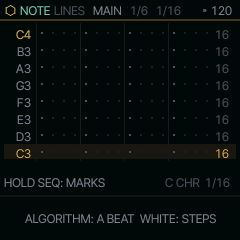
MAIN
| Knob | Label | Range | Starts at |
|---|---|---|---|
| 1 | LANE | C3 D3 E3 F3 G3 A3 B3 C4 | C3 |
| 2 | LEN | =LEN | =LEN |
| 3 | FILL | -7 .. 64 | 0 |
| 4 | ROT | 0 .. 63 | 0 |
Pages
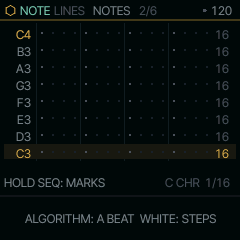
NOTES
| Knob | Label | Range | Starts at |
|---|---|---|---|
| 1 | LINE | 0 .. 255 | 0 |
| 2 | LANE | C3 D3 E3 F3 G3 A3 B3 C4 | C3 |
| 3 | NOTE | AUTO .. G9 | AUTO |
| 4 | OCT | -2 .. 2 | 0 |
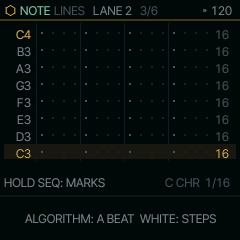
LANE 2
| Knob | Label | Range | Starts at |
|---|---|---|---|
| 1 | PAD | 0 .. 16 | 0 |
| 2 | LOOP | OFF 1 BAR 2 BAR 4 BAR 8 BAR | OFF |
| 3 | WAKE | 1 .. 8 | 1 |
| 4 | NAP | 0 .. 8 | 0 |
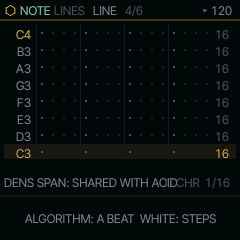
LINE
| Knob | Label | Range | Starts at |
|---|---|---|---|
| 1 | DENS | 1 .. 32 | 10 |
| 2 | SPAN | 1 .. 8 | 5 |
| 3 | TRN | -12 .. 12 | 0 |
| 4 | STYLE | WALK OCTAVE PEDAL ARP CALL | WALK |
SEQ
| Knob | Label | Range | Starts at |
|---|---|---|---|
| 1 | LEN | 1STEP .. 64STEP | 16STEP |
| 2 | DIV | 4BAR 2BAR 1/1 1/2 1/4 1/8 8T 1/16 16T 1/32 | 1/16 |
| 3 | SWG | 0% .. 100% | 0% |
| 4 | GATE | 1% .. 100% | 50% |
Where it comes from
LINES is the shell's (firmware/src/shell.c), the same lanes as RUDIMENT's with a second set of them; the rows follow Bitwig's Stepwise.